 HREN


SmoovPlay, a free Windows program that receives a PS5’s Remote Play picture on a PC and has the graphics card draw AI frames so 30 fps console games play at 60, 90 or up to 120 fpsSmoovPlay, PS5 Remote Play 화면을 PC로 받아 그래픽카드가 AI 프레임을 그려 넣어 30fps 콘솔 게임을 60·90·최대 120fps로 보여 주는 Windows용 무료 프로그램
SmoovPlay is a free, MIT-licensed program for Windows 10 or 11 (64-bit) that receives a PS5’s Remote Play picture on a PC and has an NVIDIA GeForce RTX 30, 40 or 50 series card draw AI frames between the game’s frames, so a 30 fps game plays at 60, 90 or up to 120 fps to match the screen; AMD Radeon and Intel Arc cards and connecting through the Xbox app or a capture card are Experimental options. A PS5 is registered by signing in to PSN once in chiaki-ng, a free, unofficial Remote Play app, the installer is not code-signed yet so Windows warns first, and setup downloads about 5 GB. Motion gets smoother but the game still responds like 30 fps and a little later, so the README says it is not for competitive online play.SmoovPlay는 PS5 Remote Play 화면을 Windows 10·11(64비트) PC로 받아 NVIDIA GeForce RTX 30·40·50 시리즈 그래픽카드가 프레임 사이에 AI 프레임을 그려 넣어 30fps 게임을 화면에 맞춰 60·90·최대 120fps로 보여 주는 MIT 라이선스 무료 프로그램이고, AMD Radeon·Intel Arc 그래픽카드와 Xbox 앱·캡처 카드 연결은 실험 단계입니다. PS5는 비공식 무료 Remote Play 앱 chiaki-ng에 PSN으로 한 번 로그인해 등록하고, 설치 파일은 아직 코드 서명이 없어 Windows가 먼저 경고하며 설치 중 약 5GB를 내려받습니다. 움직임은 부드러워지지만 조작 반응은 30fps 그대로에 조금 더 늦어져 경쟁 온라인 게임용은 아니라고 README는 적었습니다.
- Checked확인일
SmoovPlay is a free Windows program under the MIT License that receives a console’s picture on a PC and has the graphics card draw new frames between the ones the game sends, live, so a 30 fps game plays at 60, 90 or up to 120 fps to match the screen. It needs a PC with Windows 10 or 11 (64-bit), 8 GB of memory and 12 GB free during setup, an NVIDIA GeForce RTX 30, 40 or 50 series card, a PS5 with Remote Play turned on, and Ethernet or 5 GHz or 6 GHz Wi-Fi for both the console and the PC, while AMD Radeon and Intel Arc cards and connecting through a capture card or the Xbox app are Experimental options. A PS5 reaches the PC through chiaki-ng, a free, unofficial Remote Play app, in which the user signs in to PSN once to register the console, and nothing is installed on the console.SmoovPlay는 콘솔 화면을 PC로 받아 그래픽카드가 게임이 보낸 프레임 사이에 새 프레임을 실시간으로 그려 넣어, 30fps 게임을 화면에 맞춰 60·90·최대 120fps로 보여 주는 Windows용 무료 프로그램이며 코드는 MIT 라이선스입니다. 필요한 것은 Windows 10이나 11(64비트)과 메모리 8GB, 설치 중 빈 공간 12GB를 갖춘 PC, NVIDIA GeForce RTX 30·40·50 시리즈 그래픽카드, Remote Play를 켠 PS5, 콘솔과 PC 모두 이더넷이나 5GHz·6GHz Wi-Fi이고, AMD Radeon·Intel Arc 그래픽카드와 캡처 카드·Xbox 앱 연결은 실험 단계입니다. PS5 화면은 비공식 무료 Remote Play 앱 chiaki-ng로 받으므로 chiaki-ng에 PSN으로 한 번 로그인해 콘솔을 등록하고, 콘솔에는 아무것도 깔지 않습니다.
The installer, SmoovPlay-Setup.exe, is not code-signed yet, so the browser and Windows warn first; setup installs for the current Windows user only, without admin rights, and downloads about 5 GB of Python, PyTorch and NVIDIA TensorRT, each from its official source. The README says there is no account, ads or tracking, that the program only talks to GitHub, for updates, and that it sends nothing about the user, and updates from inside the app must carry SmoovPlay’s signature before they run. The extra frames are generated, so motion gets smoother while the game still responds like 30 fps and a little later than without SmoovPlay, so the README says it is not for competitive online play. It is an early version, with v0.3.8 the newest on GitHub when checked on November 19, and chiaki-ng, patched through the chiaki_tap folder, is a separate program under the GNU AGPL 3.0.설치 파일 SmoovPlay-Setup.exe는 아직 코드 서명이 없어 브라우저와 Windows가 먼저 경고하고, 설치는 관리자 권한 없이 그 Windows 사용자에게만 되며 Python·PyTorch·NVIDIA TensorRT 약 5GB를 각 공식 출처에서 내려받습니다. README는 계정·광고·추적이 없고 업데이트를 위해 GitHub와만 통신하며 사용자에 관한 것을 보내지 않는다고 적었고, 앱 안 업데이트는 SmoovPlay 서명이 있어야 실행됩니다. 늘어난 프레임은 생성된 것이라 움직임은 부드러워지지만 조작 반응은 30fps 그대로에 SmoovPlay가 없을 때보다 조금 늦어져 경쟁 온라인 게임용은 아니라고 README는 적었습니다. 지금은 초기 판이고 11월 19일 확인 때 최신 판은 v0.3.8이었으며, chiaki_tap 폴더의 패치를 댄 chiaki-ng는 GNU AGPL 3.0 아래의 별도 프로그램입니다.
RIFE, an AI model, draws 1, 2 or 3 new frames between each pair the game sends, and the developer’s own timing of one 1080p in-between frame from RIFE 4.22 lite on an RTX 4070 Ti SUPER is about 9 ms. With a PS5, a small patch to chiaki-ng hands every video frame to SmoovPlay, which draws the in-between frames on the graphics card with RIFE through TensorRT and then scales the 1080p picture to the monitor with AMD FSR 1.RIFE AI 모델이 게임이 보낸 프레임 두 장 사이에 새 프레임을 1·2·3장 그리며, 개발자가 RTX 4070 Ti SUPER에서 RIFE 4.22 lite로 1080p 중간 프레임 하나를 따로 잰 시간은 약 9ms입니다. PS5에서는 chiaki-ng에 댄 작은 패치가 모든 영상 프레임을 SmoovPlay에 넘기고, SmoovPlay는 그래픽카드에서 TensorRT로 RIFE를 돌려 중간 프레임을 그린 뒤 AMD FSR 1로 1080p 화면을 모니터에 맞게 키웁니다.
In the video window, R saves the last 30 seconds to 5 minutes as an MP4 at the frame rate shown and with the game’s sound, and B saves a before-and-after video, while the picture can be restyled live with 14 looks such as Golden hour and Noir, or with a look of one’s own shared as a short code.영상 창에서 R은 최근 30초에서 5분까지를 보이는 프레임률과 게임 소리 그대로 MP4로 저장하고 B는 전후 비교 영상을 저장하며, Golden hour·Noir 같은 14가지 룩으로 화면을 실시간으로 바꾸거나 자기 룩을 만들어 짧은 코드로 나눌 수 있습니다.
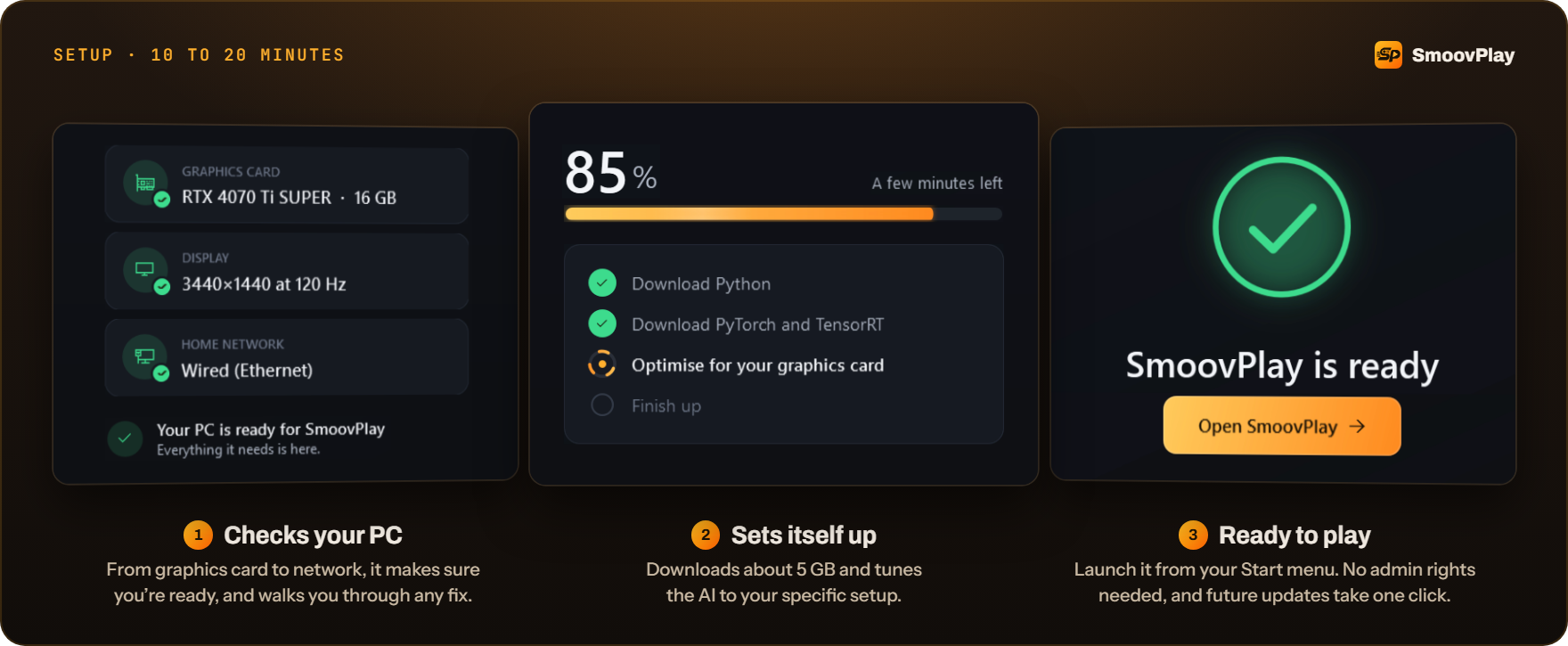
SmoovPlay-Setup.exe comes from the Releases page of the GitHub repository at no cost; setup takes 10 to 20 minutes and ends by picking settings from a short test of the graphics card and display. Connecting a PS5 through the app’s Connect your PS5 guide, which turns on Remote Play and signs in to PSN in chiaki-ng to register the console, takes about five minutes once, and the Play button then starts the stream.GitHub Releases에서 SmoovPlay-Setup.exe를 받아 실행하며 비용은 들지 않고, 설치는 10~20분 걸리고 끝에 그래픽카드와 화면을 짧게 시험해 설정을 고릅니다. 앱의 Connect your PS5 안내대로 Remote Play를 켜고 chiaki-ng에서 PSN에 로그인해 콘솔을 등록하는 데 한 번 약 5분이 걸리고, 그다음 Play를 누르면 시작됩니다.
The project’s own timing in live play of a 30 fps PS5 game over Ethernet puts the delay at about 36 ms at 90 fps, on top of Remote Play’s own, and the figure of about 20 ms at 60 fps comes from a recorded clip. What has been shown and measured live is 60 and 90 fps, and no 120 fps clip or live measurement is published yet. Remote Play arrives at 1080p, so the picture is a little softer than HDMI straight from a console, and frames can arrive late and in bunches on Wi-Fi. The README says the Experimental DirectML path for AMD and Intel cards draws the same frames as the NVIDIA engine about 1.7 times more slowly, and that it has not yet met a game on a real AMD or Intel card. SmoovPlay is an independent project, not made, supported or endorsed by Sony Interactive Entertainment, NVIDIA or AMD.프로젝트가 30fps PS5 게임을 이더넷으로 실제 플레이하며 잰 지연은 90fps에서 약 36ms로 Remote Play 자체 지연 위에 더해지고, 60fps의 약 20ms는 녹화 클립에서 잰 값입니다. 실제로 보이고 측정된 것은 60·90fps이고 120fps 클립이나 실측은 아직 공개되지 않았습니다. Remote Play 화면이 1080p로 와서 HDMI로 바로 받을 때보다 조금 흐리고, Wi-Fi에서는 프레임이 늦게 몰려 올 수 있습니다. README는 AMD·Intel용 DirectML 실험 경로가 NVIDIA 엔진보다 같은 프레임을 약 1.7배 느리게 그린다고 설명하며, 실제 AMD·Intel 카드로 게임을 돌린 결과는 아직 없다고 적었습니다. SmoovPlay는 Sony Interactive Entertainment·NVIDIA·AMD가 만들거나 지원하지 않는 독립 프로젝트입니다.
Keep reading더 읽기
All articles전체 글vibe-billvibe-bill
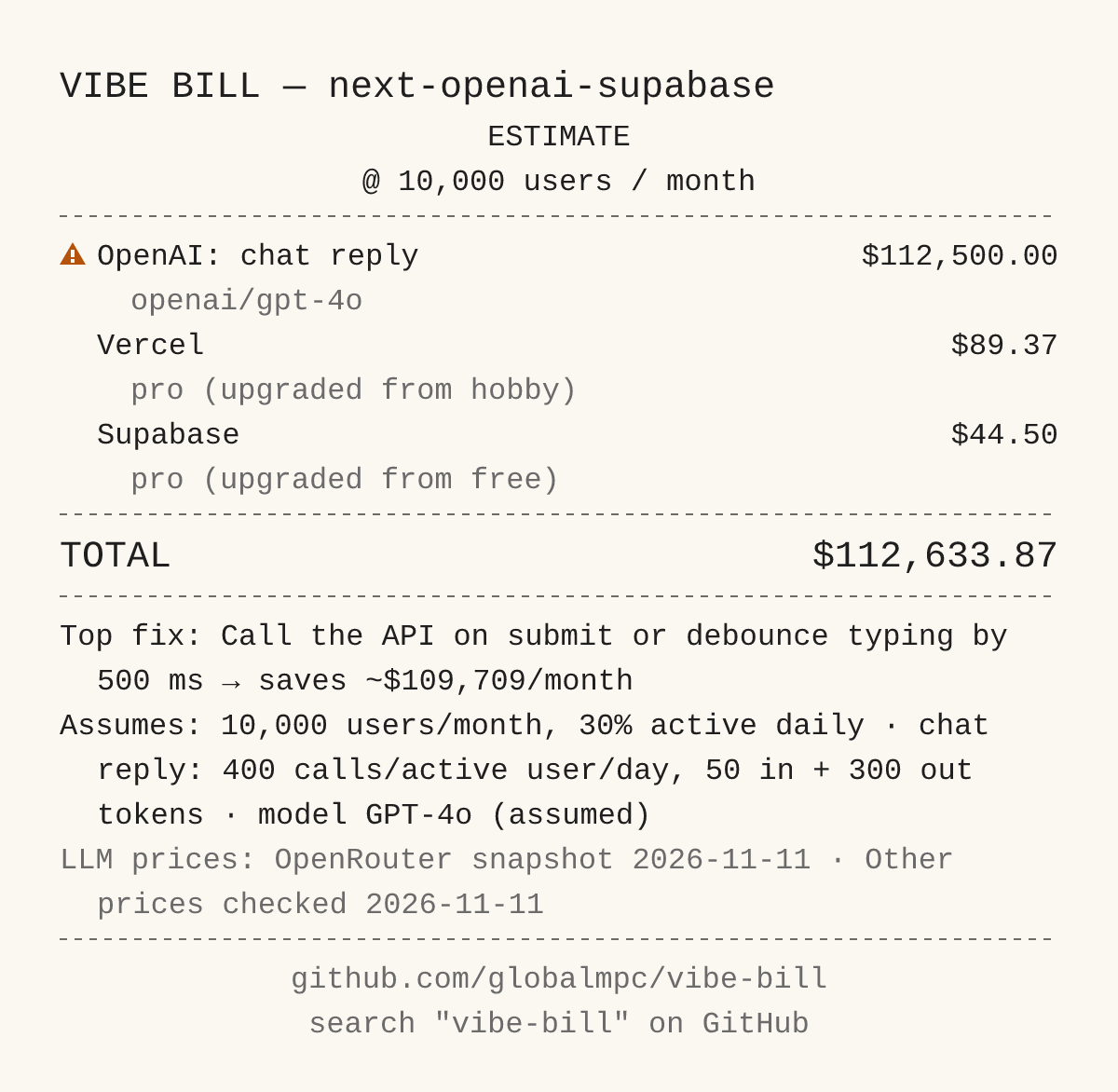
vibe-bill, a Claude Code skill that estimates an AI-built app’s monthly bill at 100 to 100,000 users and points out the code that makes it biggervibe-bill, AI로 만든 앱의 월 비용을 사용자 100명부터 100,000명까지 어림하고 비용을 키우는 코드를 짚는 Claude Code 스킬
Checked확인일
Image: vibe-bill README.그림: vibe-bill README.
antialgorithmantialgorithm
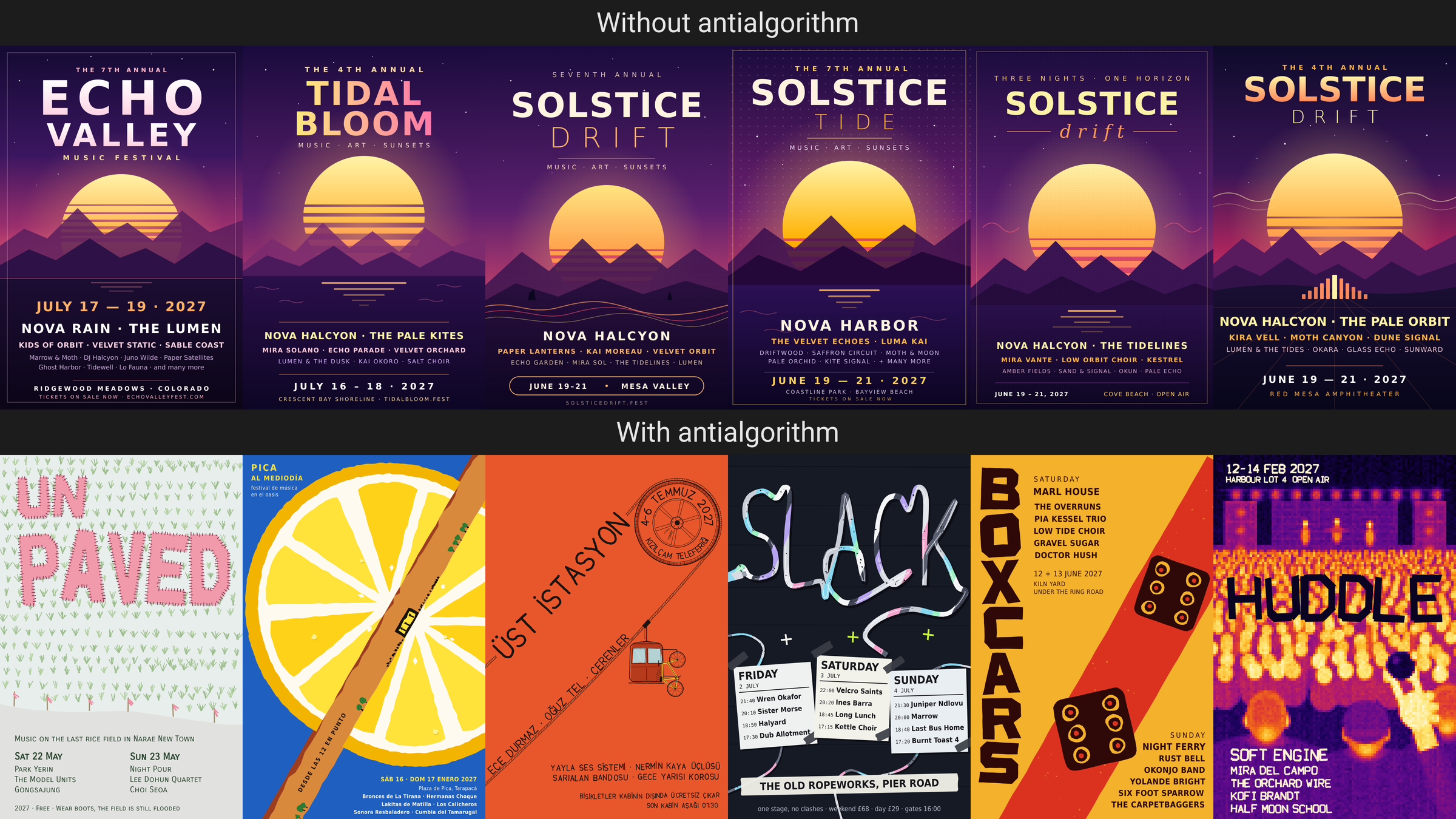
antialgorithm, an MIT-licensed Claude Code skill that makes the model name its first, most average pick in creative work and move away from it for a reason taken from the projectantialgorithm, 창작 일에서 모델이 가장 평범한 첫 안을 먼저 짚고 프로젝트에서 가져온 까닭으로 그 안에서 벗어나게 하는 MIT License Claude Code 스킬
Checked확인일
Image: antialgorithm README.그림: antialgorithm README.
rust-anythingrust-anything
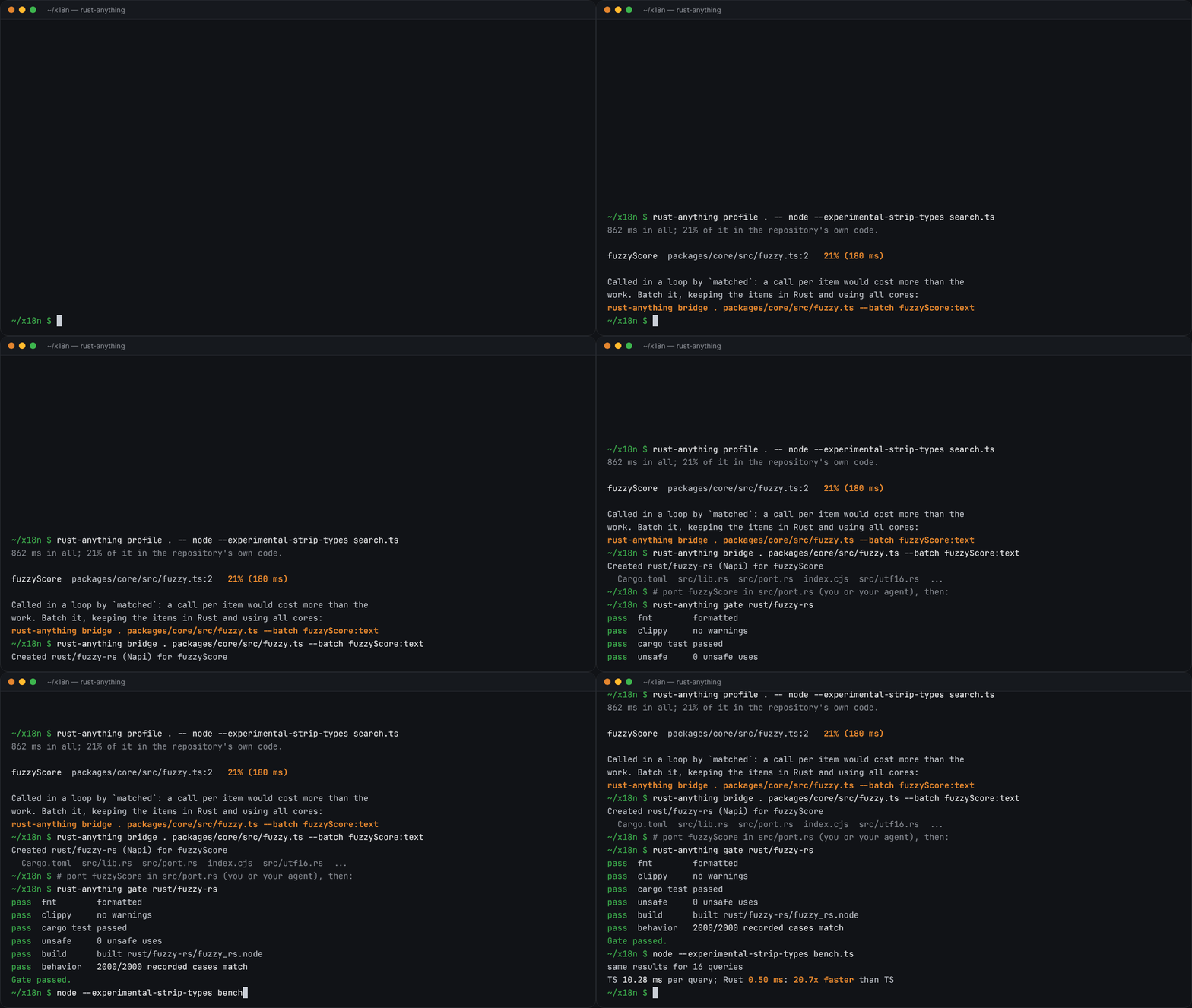
rust-anything, an MIT-licensed command-line tool that moves a Node.js, Python, C, Go, Ruby or Java app to Rust one piece at a time and checks each piece against recordings of the originalrust-anything, Node.js·Python·C·Go·Ruby·Java 앱을 한 조각씩 Rust로 옮기며 조각마다 원래 코드의 기록과 맞춰 보는 MIT License 명령줄 도구
Checked확인일
Image: rust-anything README.그림: rust-anything README.